 Sonith Manakkat
Finance app for Android
MySpend
Track spending, bills and budgets. Your data stays on your phone.
Google Play: coming soonPrivacy policySee the screens
What it is
MySpend is a personal money tracker for families in India. Add what you spend, set budgets, keep an eye on bills, and see where your money goes. Your data stays on your phone.
Who it is for. People and families who want a simple, private way to track rupees: salaried households, parents managing school fees and health records, and anyone who prefers an app with no account and no ads.
The screens
Shown with sample data. Swipe, scroll or use the buttons.
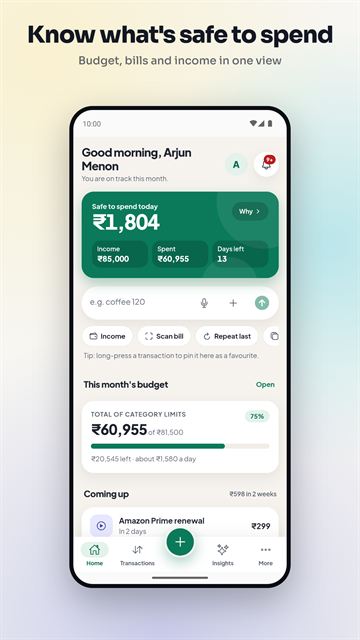
Know what is safe to spendThe home screen shows what is safe to spend today, with income, spent and days left, a quick-add line, this month's budget and what is coming up.
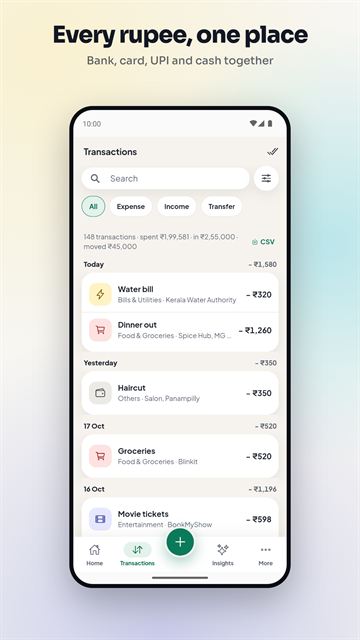
Every rupee, one placeTransactions from bank, card, UPI and cash in one list, grouped by day, with search and filters.
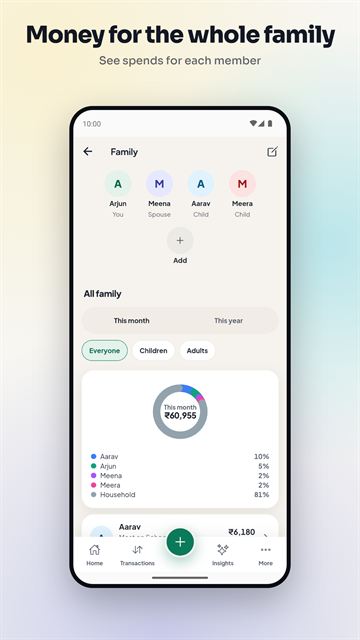
Money for the whole familyPick who each expense was for, and see what each family member costs this month or this year.
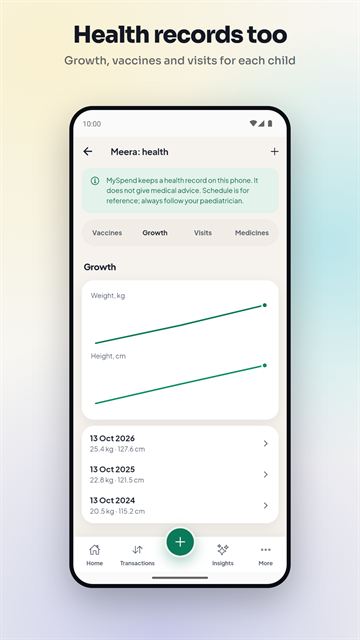
Health records tooA record book for each child: growth chart, vaccines, doctor visits and medicines. It gives no medical advice.
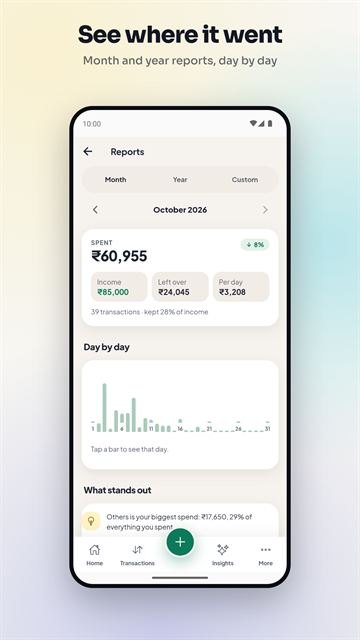
See where it wentReports by month, year or a custom range, with a day-by-day chart and a plain note on what stands out.
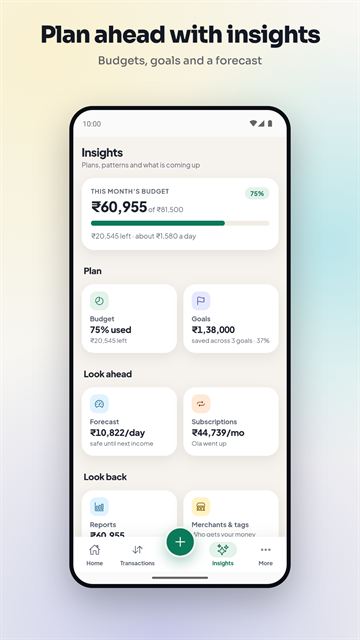
Plan ahead with insightsBudget, goals, a spending forecast and subscriptions, with reports and merchant breakdowns one tap away.
How it works
- 1. AddType a line like "coffee 120 yesterday", scan a bill with your camera, or paste or share a bank message. MySpend reads it on your phone.
- 2. CheckYou see a preview of the amount, date and merchant before anything is saved, so you stay in control.
- 3. SeeBudgets, reports and reminders update. You see what is safe to spend and what is coming up.
What it does
- LedgerExpenses, income and transfers with categories, tags and notes. Search, filter, sort and edit in bulk.
- AccountsBank accounts, cash, credit cards, loans and investments, with net worth.
- BudgetsA limit per category and an overall monthly budget, with alerts as you near the limit.
- Bills and remindersAdd bills, EMIs and subscriptions and get a reminder notification before they fall due.
- Scan a bill or receiptTake a photo or pick one from your gallery. The text is read on your phone and fills in an expense or a bill reminder, for you to check.
- Import bank messagesPaste a bank or UPI message, or share one to MySpend. It reads only the text you choose, and you review it before saving.
- Quick addType "coffee 120 yesterday" and check the preview.
- ReportsBy month, year or a custom range, with trends and a plain-language summary of what changed.
- FamilyAdd the people you spend on, pick who an expense was for in one tap, compare the family, and set optional monthly limits.
- School fee plannerMonthly, quarterly, term or yearly fees for each child, with a reminder a week before. Mark a fee paid and it is logged as an expense.
- Family health recordVaccine schedule, growth log, doctor visits, medicine courses, readings and check-up reminders, kept on your phone. A record book only.
- Subscriptions and splitsSubscriptions, an upcoming-bills forecast, and shared and split expenses.
- Import, export and backupImport from CSV, export as CSV, back up to a file and restore it later.
- App lockA PIN and optional fingerprint or face unlock. Light and dark themes, and Indian number grouping (lakh and crore).
Private by design
Good to know
- Amounts are in Indian rupees only.
- Text reading works best on clear, printed bills. Check the amount, date and merchant before saving.
- English and Devanagari text are read by the phone. Other Indian scripts are not, though English text and numbers on the same bill are.
- Bill photos and bill reminders are not included in the backup file.
- There is no cloud sync. If you lose your phone and have no backup file, the data is gone.
- MySpend does not connect to banks. Add transactions yourself, import a CSV, or paste or share bank messages.
Questions
Is MySpend on Google Play?
It is being prepared for Google Play. This page will show a Google Play button when it is live.
Does it need an account or the internet?
No account. MySpend's own code makes no network requests. One link in Settings opens the privacy policy in your browser when you tap it.
Where is my data kept?
On your phone only. There is no server and no cloud copy, so use the backup file feature to protect it.
Can it read my SMS inbox?
The Google Play version cannot. You paste or share the messages you choose.
Is it a bank or payments app?
No. It is a tracker. It does not move money, offer loans or connect to your bank.
How do I move to a new phone?
Back up to a file, copy the file across, and restore it in MySpend on the new phone.
Get it
MySpend is in testing and is being prepared for Google Play. A store button will appear on this page when it is live. Test builds that you can install without Google Play are on the downloads page, and the privacy policies are all in one place. Questions or bug reports: sonythm@gmail.com.
Google Play: coming soonAll apps